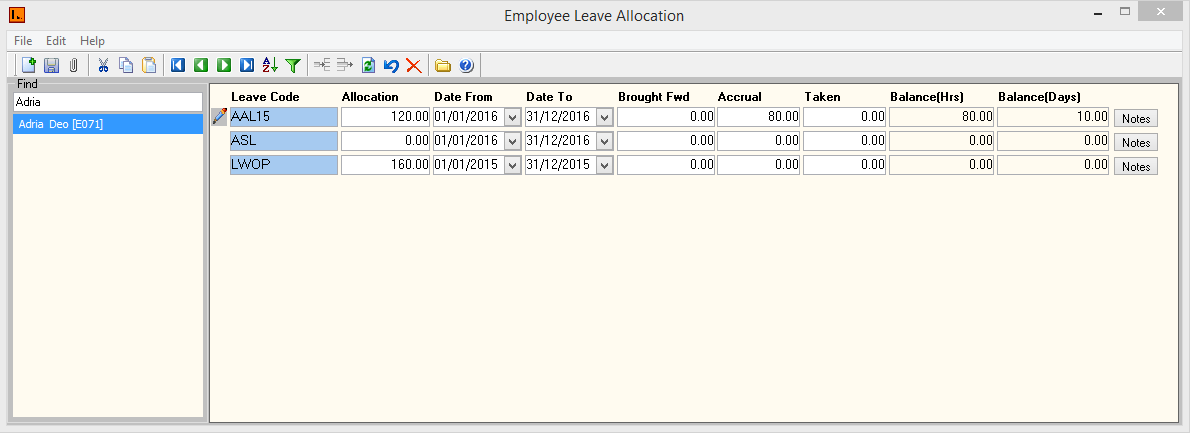
Figure 1: Employee Leave Allocation Screen
This Menu
has allocated Employee Leave information.
Leave can
be allocated by the following in this screen:
Figure
1: Employee Leave Allocation Screen
Employee
Leave Allocation contains the following types of
information.
|
Fields |
Description |
|
Leave
Code |
The
different types of leave the employee is entitled too. |
|
Allocation |
Leave
Entitlement. This is setup in the Leave
Code menu for each leave defined
above. |
|
Date
From |
For a new employee, this date is generated from the Start
Date field in the Employee Profile screen. When an Leave anniversary
is reached, the system automatically updates this field when the Pay
Sequence containing Leave anniversary date is closed |
|
Date
To |
When the End date falls within the next Pay Period to be
closed, the balance of the Leave is carried over into the Leave Brought
Forward field (including that period's accrual). The Leave balance field
is then re-set to zero. |
|
Brought
Fwd |
Displays the total of all Leave units (hours or days) brought
forward from previous Leave periods. When the employee's Leave date to
falls within the next pay Period to be closed, the balance field is
carried over into Brought Forward (including that period's
accrual). The Balance field is then re-set to zero. |
|
Accrual |
This field shows the progressive accrual of leave units during the current
Leave period. The system automatically updates this field whenever a Pay
Period is closed with the number of units that an employee has accrued in
that Pay Period. The manner in which this field is updated is determined
by the Leave record setup. If a leave is setup as
one-time accrual, this field will display the entitlement
figure. |
|
Taken |
The system automatically updates this field when employee takes
leave. It updates the field with the number of Leave units paid to an
employee in their current Leave period. |
|
Balance
(Hrs) / (Days) |
Displays the total number of units an employee is entitled too.
The entitlement will be displayed in days and hours. Balance: (Brought Forward + Accrual) –
Taken |