

 Link Technologies - LinkSOFT Documentation Link Technologies - LinkSOFT Documentation
 This Menu has Employee Transaction information. This screen is automatically populated when a leave request is made using web based ESS.
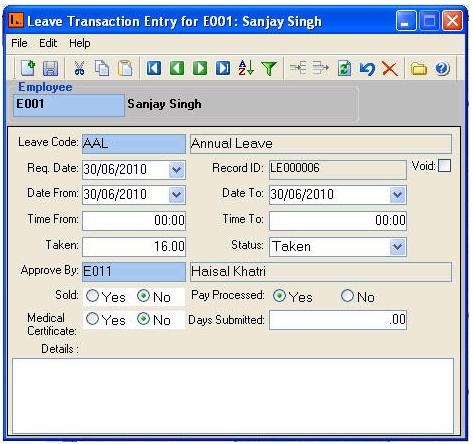
Employee Transaction contains the following types of information:
| Fields | Description |
| Employee Code | Select employee code |
| Leave Code | Select the relevant Leave type. |
| Req Date | The date the employee submitted the request for leave. |
|
Date From |
The employee's start date for the leave. |
| Date To | The employee's end date for the leave. |
| Time From | The employee's start time for the leave. |
| Time To | The employee's end time for the leave. |
| Taken | The quantity of hours or days for the requested leave. |
| Status | The
options are 'Planned', 'Approved', 'Applied', 'Due', 'Taken' and 'Void'.
|
| Approve By | The employee that approved the leave request. This is usually the employee's Manager or HR department. |
| Sold | Some organizations allow employees to sell their leave back to the company. If the employee’s leave is sold, then select Yes. No will be displayed as default. |
| Medical Certificate | If employee has medical certificate select Yes. No will be displayed as default. |
| Pay Processed | Once the leave is processed through Payroll, Pay Processed for the leave transaction will show ‘Yes’. |
| Details | Any additional information for the leave request. |
See Also ESS Leave Requests
 Only Leave with
status Taken will be paid and processed through
Payroll.
Only Leave with
status Taken will be paid and processed through
Payroll.