Link Technologies - LinkSOFT Documentation Link Technologies - LinkSOFT Documentation
 [524-2] | Inventory | Transfer | Ship
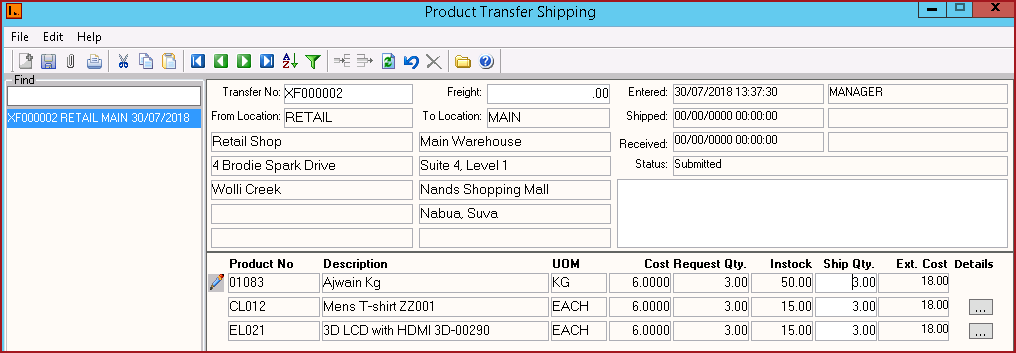
The Ship menu is used to ship items from one location to another. A transfer request must be submitted to process shipment.
Notes:
Steps to Create a Transfer Request
Report
Configurations :
Table 1 : Field Description for Product Transfer Shipping
|
Fields |
Description |
| Transfer No | Transfer Number is the same as the "Transfer Request". |
| From Location |
"From Location" detail is updated from the "Transfer Request". |
|
To Location |
"To Location" detail is updated from the "Transfer Request |
Freight |
"Freight" detail is updated from the "Transfer Request |
| Entered | This is the date and time the "Transfer Request" was entered in the system. Date and Time is depicted from the machine. User who created the request is also updated. |
Shipped |
This is the date time the transfer was "Shipped" from the system. Date and Time is depicted from the machine. User who created the request is also updated. |
|
Received |
This is the date and time the transfer was "Received" in the system. Date and Time is depicted from the machine. User who created the request is also updated. |
| Status | The status is automated updated as "Request","Submitted", "Shipped" and "Received" as the transfer is actioned. |
| Product No | This is the product code for the item transfered. |
| Description | Description of the product is auto updated. |
| UOM | This is the unit of measure of the item. This is updated from the product setup on the Product Master. |
| Cost | Cost of the item is depicted from the Product Master. |
| Request Quantity | Request Quantity is the quantity of item requested in the transfer. This is updated from the "Transfer Request". |
| Instock | Instock is the current "Stock on Hand" of the item. Instock is updated from the stock levels on the Product Master . Instock is extracted for the "From Location" in the transfer. |
| Ship Quantity | Enter the quantity of the items to ship. |
| Ext Cost | Exist Cost is calculated by the system based on the transfer quantity and cost. Exist Cost = Quantity x Cost. |
| Details | The Details button is enabled for "Lot Bin" and "Product Matrix" products. |
Figure 2: Product Transfer Shipping