Link Technologies - LinkSOFT Documentation Link Technologies - LinkSOFT Documentation
"Lot Bin" indicates that a product has a "Serial Number" . Serial numbers are used to identify inventory. This is setup on the Product Master.
When creating an adjustment for such items, a details
button
 will be added on the screen. Refer to Figure
1.
will be added on the screen. Refer to Figure
1.
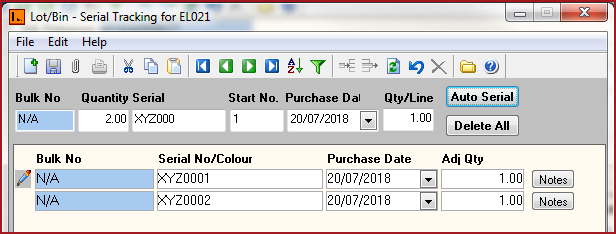
Go into the details and enter the serial numbers. Refer to Figure 2
Bulk No - This is the BIN Code for the product. Bins are maintained per Location .
Quantity - This is automatically populated based on the adjustment quantity.
Serial - Enter the specific serial numbers for the products.
User can manually type the serial number for each record.
To enter manual serial numbers for the item click on "Add New Record icon" or "Ctrl + N" to insert line records.
Enter the serial numbers and save record.
Users can "Auto Serialize" the products.
Enter the masking for the serial numbers in the "Serial" field. For example XYZ000
Enter the starting number for the serial in the "Start No" field. For example 1.
Click on the "Auto Serial" for the system to generate the serial numbers. For example, if 2 Lot Bin were adjusted in with above settings the serial numbers would be XYZ0001 and XYZ0002.
Date Selection - The date selection is enabled on the screen for the users to specify a date. Users can configure the date label to meet the business needs. For example Company A, may like to capture the "Purchase Date" of the serial item while Company B would like to record the"Expiry Date".
Quantity/Line - Quantity per Line defines the "Adjustment Quantity" per entry. For example if the "Quantity/Line" is set to 2. One detail line will be created at "Auto Serial" and quantity for the adjustment will be 2.
Delete All- Use this to delete all details.
Notes:
Figure 1: Lot Bin Detail
.png)
Figure 2: Serial Numbers