

 Link Technologies - LinkSOFT Documentation Link Technologies - LinkSOFT Documentation
 [421] | Human Resource Management |Employee Administration | Employee Profile Menu | Payment Tab
Pay Details contains below details about an employee:
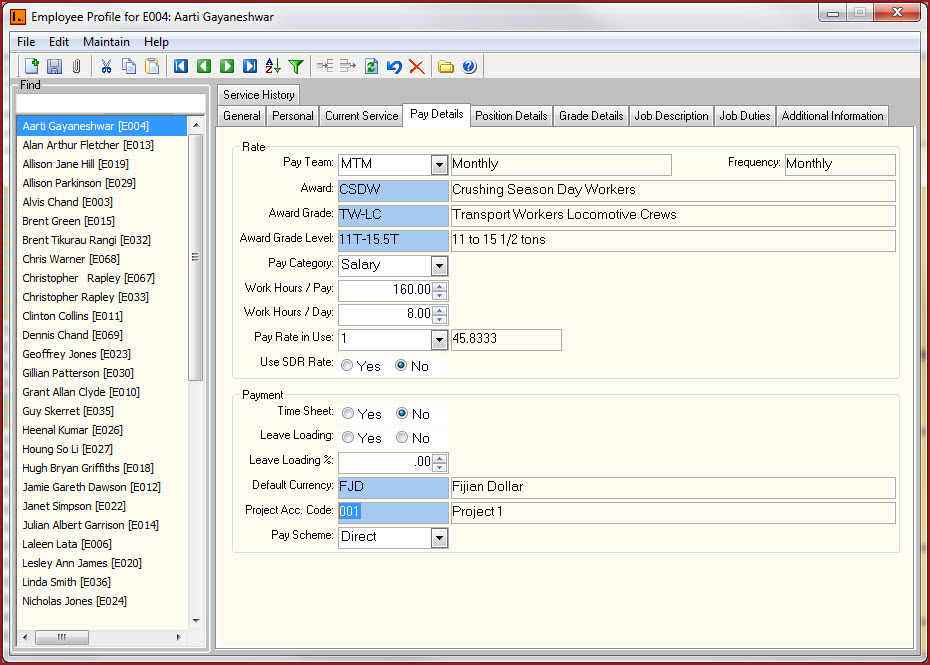
|
Fields |
Description
|
Pay
Team
|
Pay Team defines the pay frequency for an employee,for example, weekly, fortnightly, or monthly. Pay Teams are maintained under Setup Codes. Pay Team has below functionalities:
|
| Award | Select the Award. Details are setup under Setup Codes -> Award. |
| Award Grade | Select the Award Grade.Details are setup under Setup Codes -> Award. |
| Award Grade Level | Select the Award Grade Level.Details are setup under Setup Codes -> Award. |
Pay Category
|
Select the pay category for the employee.
For example: Caitlin is employed as a teacher and
receives salary income. She has regular set working hours and receives an
annual income of $52,000 which is paid to her on a fortnightly basis
|
Work
Hours
/Pay
|
Enter the contracted or expected working hours per pay for the employee.
In the case of full-time and part-time
employees this is typically static and should be entered. In the case of
casual employees, you can enter only values that are indicative of their
average hours worked for a pay.
|
Work
Hours/Day
|
Enter the contracted or expected
working hours per day for the employee.
|
|
Pay Rate in Use
|
Shows the rate an employee is paid. The
Rate Code shown here is used as the default if no other rate is entered
against a transaction. Rates for employees are setup in the
Employee
Rate
screen.
|
Use SDR Rate
|
The
options are 'Yes' or 'No'.
|
|
Time Sheet
|
Select ‘Yes’ if
the employee’s hours are entered through timesheet or
leave the field as 'No'.
|
|
Leave Loading |
Enable "Leave Loading" if loading allowance will be paid to an employee if employee takes leave. This is applicable in Australia. |
|
Leave Loading Percentage |
Enter the percentage of leave loading that should be paid to the employee. For example,
|
|
Default Currency |
Select the default currency with which pay will be paid to an employee. Currency are maintained in Common Services->Currency. |
|
Project Acc. Code |
|
|
Pay Scheme |
Select the method that will be used to pay the employee. Payment option are:
Users can setup multiple payment schemes on the
employee Direct Credit menu. |