This Menu has Employee Direct Credit information.
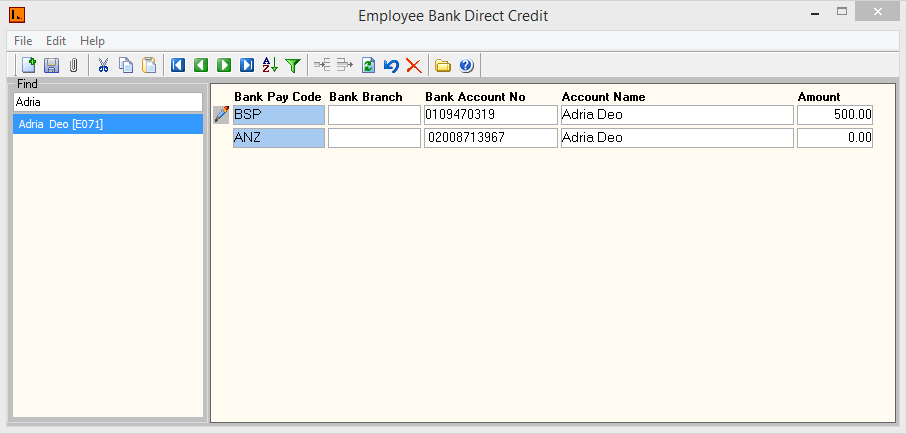
Figure 1: Employee Bank Direct Credit
Screen
Employee Direct Credit contains the following types of information:
|
Fields |
Description |
|
Employee Code |
Select employee code |
|
Bank Pay Code |
This is the bank code that will appear on the employee's account. |
|
Bank Branch |
This is the employee's valid bank branch. |
|
Bank Account No |
This is the employee's valid bank account number |
|
Account Name |
For security purposes some banks require both an Account Name and Account number in order to verify direct credit transactions. |
|
Amount |
Leave the amount ‘0’ if this is the employee’s main bank. If an employee has a second or third bank, enter the amount which will be credited into those bank accounts. Then insert a new line for the main bank. |
Table 1: Field Descriptions for Direct Bank Credit
 Steps
Steps
- Double click Employee code and select the employee.
- Select the Add New Record icon or press CTRL + N and a new record will be created to fill in the Direct Credit details.
- Enter the above details for the employee selected.
- After entering the record(s), click on the SAVE icon or select CRTL + S to save the record(s) successfully.
- Select close icon or Alt + F4 shortcut key to close the menu.