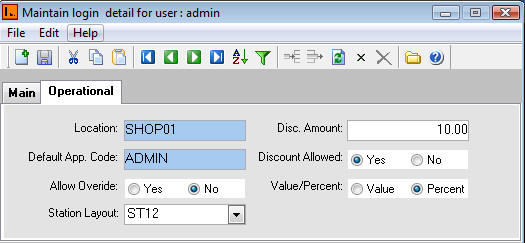
[222] | Systems Manager | Master Security | User Login Menu | Operational Tab
User Login Menu, Operational tab contains the following types of information:
|
Fields |
Description |
| Location | Location where the user is physically based. |
|
Default App. Code |
This applies if the user is given the access to approve Purchase Orders. |
| Allow Override | Authorises user to approve purchase order that does not have budgeted funds. |
| Station Layout | This is the default layout the user will use to log in to Point of Sale. |
| Disc Amount | Specify the discount amount value this user is authorised to give discount for. |
| Discount Allowed | 'Y' to authorise discounts. 'N' to disable the user from giving discounts. |
| Value / Percent | Specify whether the value entered in the Disc Amount field is Value or percentage based. |
 Steps
Steps
Double click on location code and select the location.
Double click Default Approver Code and select the code.
Tag Allow Override field.
Select the station layout from the drop down list.
Indicate whether the user should be given access to give discounts, the discount amount and if the discount amount is based on a value or percent.
After entering the record(s), click on the SAVE icon or select CRTL + S to save the record(s) successfully.
Select close icon or Alt + F4 shortcut key to close the menu.