-
Product
Matrix
is
used to define two dimension for a product. The
dimension is reflected in "Rows and Columns". Product Matrix is
enabled on the "Product Master".
-
When
creating an adjustment for such items, a details button
 will be added
on the screen. Refer to Figure 1.
will be added
on the screen. Refer to Figure 1.
-
Go into the
details button and
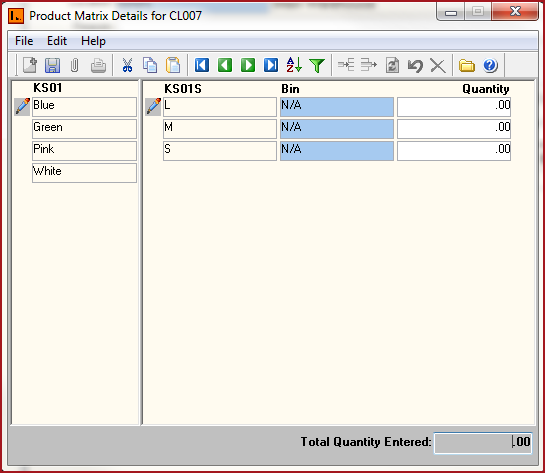
enter the details of the item. Refer
to Figure 2.
-
The rows and columns for the matrix
is depicted by the setup on the Product
Master.
-
Enter the "Quantity" for the
adjustment.
-
The "Total Quantity Entered" should
be equal to the adjustment quantity.
Figure
1: Product Matrix Details

Figure 2: Product
Matrix


 Link Technologies - LinkSOFT Documentation