| Subject: | V3 VMS Invoices doesn't show Company, Address and TIN details when using A4 Layout |
| Summary: | 1. Problem Details
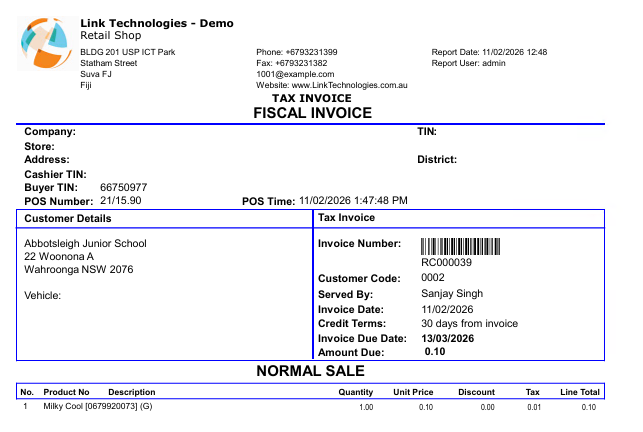
V3 VMS Invoices doesn't show Company, Address and TIN details
2. Error Message (screenshot of the error)
*** Removed image as the issue can be seen in comment 1 ***
3. Environment Details - Version - 16.01.260114.GA
|
| Audit Notes: | Edited by sanjay on 19/05/26 15:38. Edited by sanjay on 19/05/26 15:36. Edited by sanjay on 08/04/26 14:30. Edited by sanjay on 12/02/26 12:52. Edited by sanjay on 12/02/26 12:28. Edited by sanjay on 11/02/26 21:20. |
| 11 Feb 2026 | 01:01PM Comment 1 by Vineshwar Prasad Assigned To: Vineshwar Prasad Followup Date: 12-02-2026 12:56 PM Time Taken: 2.00 Notes: ETC extended from: 11/02/2026 to 12/02/2026 |
| Bula Team,
We have tested this internally and reproduced the issue. Below are the details;
Steps- Set up VSDC in the POS Configuration
- Using PFX Certificate
- Printing A4 Invoice
- Sale doen from POS
Image 1: Sample Invoice from POS
Environment Details - Server Name: LINKQA2-EBS
- Database Name: LinkSOFT
- URL: http://10.0.0.12/LinkSOFT
- Version: 16.01.260114.GA
Next Step - Get assistance from the development team.
Regards
Vineshwar Prasad |
|
| 11 Feb 2026 | 09:19PM Comment 2 by Sanjay (Link Technologies) Case L13237 added to project 16.40 |
| 12 Feb 2026 | 01:03PM Comment 3 by Sanjay (Link Technologies) Assigned To: Sanjay (Link Technologies) Followup Date: 12-02-2026 06:53 PM Time Taken: 8.00 Notes: Edited by sanjay on 21/05/26 12:49. Edited by sanjay on 21/05/26 12:46. ETC extended from: 11/02/2026 to 12/02/2026 |
| PART A - Development work for this case has been completed. 1. The change will be available in version: 16.02 and Patch for 16.01 at this link. 2. The following changes were made (Include Database object names, Program classes, and any other relevant information): - Corrected script that extracts data from VMS signed invoice.
- Since the API does not have a "user" associated with the invoice, we are unable to determine store details. We use the default username "admin" as the "served by". Here are the relevant mappings:
- Company = Company Name
- Store = Company Address 1
- Address = Company Address Line 2 and 3
- District = Company City, State, Post Code and Country
3. Affected Areas: - Receipt data for A4 Invoice using VMS3
4. The issue was caused by: - VMS 3.0 changed Fiscal invoice data causing data extraction to fail for company information
5. Other Relevant Notes:
6. Next Step (Review and System Test (Developer) -> UAT (Quality) -> Documentation): System test completed.
|
|
| 08 Apr 2026 | 02:26PM Comment 4 by Sanjay (Link Technologies) Case L13237 removed from project 16.03 |
| 08 Apr 2026 | 02:30PM Comment 5 by Sanjay (Link Technologies) Case L13237 added to project 16.03 |