Adjustment
Entry
[316-4] | Payroll | Leave Management|
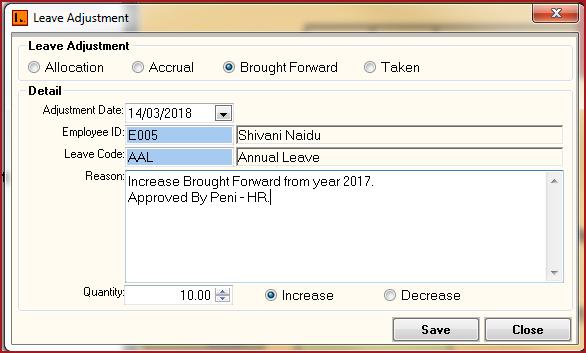
Leave Adjustment menu allows users to adjust Leave balances. Users can increase or decrease hours for Allocation, Accrual, Brought Forward or Taken.
Adjustment made will be reflected on the Leave Allocation screen and the Leave Transaction Report.
Steps
Figure 1: Leave Adjustment
Table 1 : Field Description for Leave Adjustment
|
Fields |
Description |
|
Leave Adjustment |
Leave adjustment lists the leave component to adjust. These are allocations, Accruals, Brought Forward and Taken hours. |
| Adjustment Date | Adjustment Date is the date on which the adjustment is made. |
| Employee ID | Select the employee for whom the leave needs to be adjusted. |
| Leave Code | Select the leave code to adjust. |
| Reason | Enter the adjustment reason. |
| Qty | Enter the hours of leave to be adjusted. |
| Increase/Decrease | State whether to increase or decrease leave amounts. |